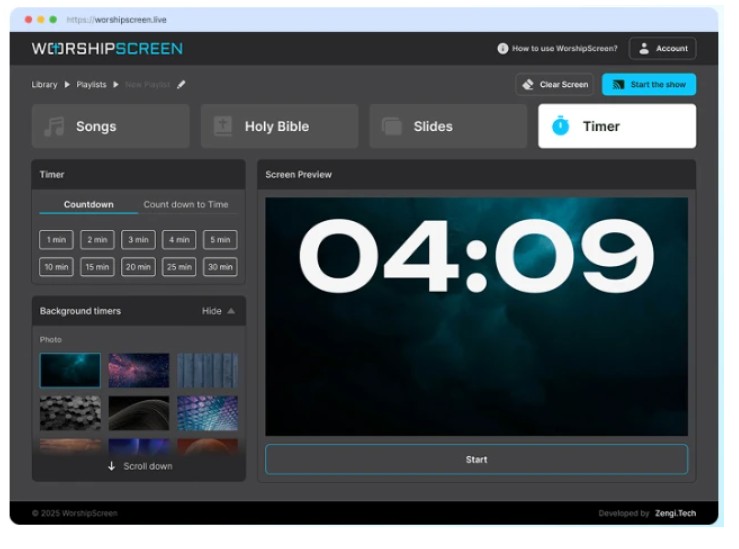
WorshipScreen: A Complete Church Presentation Solution for Songs, Scripture and Sermons
Visual presentation has become a practical part of many modern church services. Congregations often follow worship songs from a large screen, read Bible passages during sermons, watch videos, and receive information about upcoming church events through presentation slides. When these materials are prepared with the right tools, the screen can quietly support the service from beginning to end.
The challenge is that a church may need several different types of content during one service. Lyrics, Scripture, photographs, announcements, videos, and sermon materials can easily become scattered between different files and applications. This creates additional work for the person responsible for the presentation and increases the possibility of technical mistakes.
WorshipScreen provides a unified solution for this workflow. It is church presentation software that can be accessed through a web browser and used to organize worship songs, Bible verses, sermons, images, videos, backgrounds, and other visual materials. Churches can prepare a complete service in advance and then operate the presentation while the service is taking place.
Because WorshipScreen is available as a free tool, it can be particularly useful for congregations that want a practical presentation system without committing to expensive professional software.
Understanding the Role of Church Presentation Software
Church presentation software has a simple but important purpose: it connects what is happening during the service with what the congregation sees on the screen.
When a worship team begins a song, the lyrics should appear. When the pastor refers to Scripture, the relevant passage can be displayed. When announcements begin, the correct information should be ready. If a video is part of the service, it should be available at the appropriate moment.
Without a dedicated workflow, the operator may need to search through folders, switch between applications, open documents, and launch videos manually.
A presentation platform such as WorshipScreen allows these materials to be organized before the service. The operator can then work from a prepared sequence rather than constructing the presentation while the congregation is waiting.
Setting Up WorshipScreen
The initial setup begins in a web browser. After creating an account, the church can start preparing its presentation content.
The first useful task is to establish the basic visual style. The church can decide how lyrics and Scripture should look on the screen, including font size, positioning, colors, and backgrounds.
The best settings depend on the room and display equipment. A church using a small television may require different settings from a congregation using a large projector screen.
The important principle is readability.
Text should remain easy to see from the back of the room. Backgrounds should not interfere with letters, and slides should not contain more information than the congregation can comfortably read.
Building a Reusable Worship Library
Preparing worship songs once and reusing them can save considerable time.
A church can create a collection of songs that are frequently used during services. Each song can be reviewed before it becomes part of the regular library.
When adding lyrics, the operator should check spelling and make sure verses, choruses, bridges, and repeated sections are in the correct order.
The way lyrics are divided between slides also matters. Long paragraphs are difficult to follow while singing. Shorter phrases give the congregation enough time to read the words and remain synchronized with the worship team.
Once the library has been created, preparing a new service becomes much faster. Instead of recreating every song, the operator can select the required items and add them to the new playlist.
Creating a Service Playlist
A playlist is the central part of the weekly presentation workflow.
It can contain all the visual materials required for a particular service. For example, a Sunday playlist might include a countdown, opening worship songs, announcements, Scripture, sermon materials, a video, and a closing song.
The order should reflect the planned structure of the service.
Preparing this sequence in advance gives the operator a clear roadmap. It also makes it easier to identify missing content before the service begins.
A playlist can be created for regular weekly worship as well as special occasions. Churches may prepare separate presentations for Christmas, Easter, weddings, conferences, youth events, prayer meetings, or other gatherings.
Displaying Lyrics During Worship
Displaying lyrics is one of the most common reasons churches use presentation software.
The congregation should be able to read the words without concentrating on the screen itself. This means the typography, contrast, slide timing, and background all matter.
The operator should follow the worship leader instead of advancing slides according to a fixed timer.
If the worship leader repeats a chorus, the operator should be ready to display the chorus again. If a verse is skipped, the presentation should adapt.
The screen should follow the music rather than dictate it.
Preparing Bible Verses for Services
Bible Scripture can be prepared before a service and added to the appropriate position in the playlist.
This is particularly useful for sermons containing multiple passages. If the pastor provides the references beforehand, the operator can prepare all of them and place them in the expected order.
Each passage should be checked carefully. The operator should confirm the book, chapter, verse, and translation.
Long passages should also be divided into manageable sections. A screen filled with a large block of tiny text may technically contain the entire passage but will not provide a good reading experience.
A clear presentation allows the congregation to focus on the meaning of the Scripture rather than struggling to read it.
Supporting Sermons With Visual Materials
A sermon can involve many types of visual content.
A pastor may use a photograph to illustrate a point, a map to explain a biblical location, a quotation to emphasize an idea, or a video to introduce a subject.
These materials can be incorporated into the service presentation.
The advantage is that the operator does not need to search through a computer’s file system when the pastor reaches a particular part of the message. The relevant material has already been placed in the service sequence.
This can make the presentation feel much more coordinated.
Church Announcements on the Big Screen
Announcements can be prepared as individual slides and placed into the service playlist.
A church might need to promote an upcoming Bible study, community event, children’s program, prayer meeting, volunteer opportunity, or special service.
The announcement should communicate the most important details quickly.
A good slide generally avoids unnecessary paragraphs. The event title, date, time, and essential instructions should be immediately visible.
It is also important to update announcement slides regularly. Old dates and expired information should be removed before the next service.
Backgrounds and Visual Consistency
Backgrounds can make worship presentations more attractive, but their main function should remain supportive.
For lyrics, the background should allow the text to remain readable. If a photograph contains many details in the same area as the words, it may reduce legibility.
A church can develop a consistent presentation style by using similar backgrounds, fonts, and colors.
This creates a professional appearance without requiring elaborate graphic design for every service.
Consistency is especially useful for churches that have several volunteers preparing presentations. When everyone follows the same visual principles, the final service presentation looks more unified.
Using Videos and YouTube Content
Videos can add another dimension to a church service.
They can be used for event announcements, testimonies, sermon illustrations, missionary updates, worship introductions, or educational material.
WorshipScreen supports video content and YouTube material, making it possible to include these resources in the same service workflow.
However, online media should never be tested for the first time during the live service.
The operator should open each video beforehand, confirm that the correct content is selected, check the internet connection, and make sure the sound is routed correctly.
This is especially important because a video can depend on both internet access and the church’s audio equipment.
Connecting a Projector, TV, or LED Display
Different churches have different audiovisual systems.
A small congregation may use a laptop and projector. Another church may use a television. Larger venues may have LED walls or multiple screens.
WorshipScreen can be incorporated into these different environments.
A common configuration uses a computer connected to the display through HDMI. With an extended desktop, the operator can keep the controls on the computer while the congregation sees only the presentation.
This is preferable to duplicating the entire computer screen because the audience does not need to see the operator’s browser tabs or presentation controls.
Before the service, the operator should check the display connection and confirm that the presentation is positioned correctly.
Using a Mobile Device as Part of the Workflow
A browser-based presentation system can provide additional flexibility for church volunteers.
Depending on the technical setup, a tablet or smartphone can be used to manage presentation content while another device remains connected to the main display.
This can be helpful when the operator needs to sit somewhere else in the room or when the church does not have a permanent presentation desk.
The most important consideration is reliability. The chosen device should have a stable connection and enough battery power for the entire service.
Supporting Bilingual Congregations
Churches with members who speak different languages can use visual presentations to make worship more accessible.
Songs may be displayed in two languages, while Scripture can be presented using translations appropriate for different parts of the congregation.
Bilingual presentation requires additional attention to layout because two languages require more space.
The operator should avoid making the font too small simply to fit everything on one slide. If necessary, content can be divided across multiple slides.
A bilingual presentation works best when both languages remain clearly distinguishable and easy to follow.
Free Worship Software for Churches
Church budgets vary significantly, and not every congregation has the resources for expensive presentation systems.
For churches looking for free worship software, WorshipScreen provides a browser-based way to organize the main visual elements of a service.
The platform can be used for songs, Scripture, sermon materials, announcements, images, videos, and other presentation content.
This can be particularly useful for small and medium-sized churches that depend on volunteers. The goal is to provide a practical workflow without requiring every operator to become a professional audiovisual technician.
Methodist Worship Software and Flexible Service Formats
Church presentation needs are not limited to one denomination.
Congregations looking for methodist worship software can use WorshipScreen to organize hymns, contemporary worship songs, Scripture readings, sermon references, announcements, and multimedia content.
The same presentation approach can be adapted to other worship traditions.
A church may have a highly structured liturgy or a more flexible contemporary service. The playlist can be arranged according to the actual order of worship.
This flexibility is important because presentation software should adapt to the church rather than requiring the church to change its service structure.
How to Prepare a Service From Start to Finish
A reliable preparation process can be divided into several stages.
Review the Order of Worship
Begin with the planned service schedule. Identify every song, Scripture passage, announcement, and media item.
Prepare the Songs
Select songs from the existing library. Add new songs when necessary and review their lyrics carefully.
Add Scripture
Enter the Bible passages required for readings and sermons. Verify all references and translations.
Prepare Announcements
Update event information and remove announcements that are no longer relevant.
Add Images and Videos
Upload or select the media required for the service and check that every item is available.
Build the Playlist
Arrange all content in the order in which it is expected to appear.
Test the Presentation
Run through the playlist on the actual projector, TV, or LED screen.
Make Final Corrections
Fix spelling mistakes, incorrect references, poor slide breaks, outdated information, or media problems before the congregation arrives.
Operating the Presentation During a Live Service
The presentation operator should pay attention to the service rather than simply follow the playlist mechanically.
During worship, the operator should watch the worship leader and anticipate when the next lyric will be needed.
During a sermon, the operator should listen for Scripture references and display the corresponding material at the appropriate moment.
The playlist provides structure, but live services can change.
A worship leader may repeat a chorus. A pastor may skip a passage. An announcement may be added unexpectedly.
The operator should be comfortable moving through the prepared content instead of assuming that every item must appear exactly according to the original plan.
Preparing for Technical Problems
Preparation should include a simple backup strategy.
If an internet-based video cannot load, the operator should know whether an alternative is available. If a particular visual is not essential, the service should be able to continue without it.
The most important content, such as worship lyrics and Scripture, should be checked before the service.
It is also worth verifying the internet connection, display cable, computer power, audio output, and projector or television before people enter the room.
Technical preparation is often invisible when everything works correctly, but it can prevent significant interruptions.
A Simple Weekly Workflow for Volunteers
Once a church becomes familiar with WorshipScreen, presentation preparation can become a routine weekly responsibility.
The worship leader can provide the song list. The pastor can provide sermon references. A volunteer can then create the playlist and add the required media.
Existing songs can be selected from the library. New materials can be added as needed.
After the playlist is checked, the volunteer can test the complete presentation.
This workflow reduces last-minute preparation and allows different volunteers to share responsibility for church presentations.
Making the Screen Helpful Rather Than Distracting
The purpose of church presentation software is not to make the service visually complicated.
The best presentation is often the one that people barely notice because everything appears when they need it.
Lyrics should be visible without being overwhelming. Scripture should appear at the appropriate moment. Announcements should be clear. Videos should play without unnecessary delays.
Animations and decorative effects should never interfere with the content.
A simple, readable, well-timed presentation can be more effective than a highly elaborate one.
Conclusion
WorshipScreen provides churches with a practical way to organize and control the visual content of worship services. It brings songs, Bible verses, sermons, announcements, images, videos, backgrounds, and service playlists into a browser-based environment.
Its free availability makes it an accessible option for congregations that need church presentation software without adding a significant software cost. The reusable song library can reduce weekly preparation, while playlists help operators keep the service content organized.
The most effective workflow begins before the service. Prepare the songs, verify Scripture, update announcements, add media, arrange the playlist, and test the presentation on the actual church display.
During the service, the operator can then focus on timing and follow the worship team and speaker. When the presentation is prepared correctly, technology becomes a quiet support for worship rather than a source of distraction.
For churches looking for a flexible presentation system for worship songs, Bible verses, sermons, videos, and announcements, WorshipScreen provides a straightforward way to bring these elements together and create a consistent visual workflow for regular and special church services.