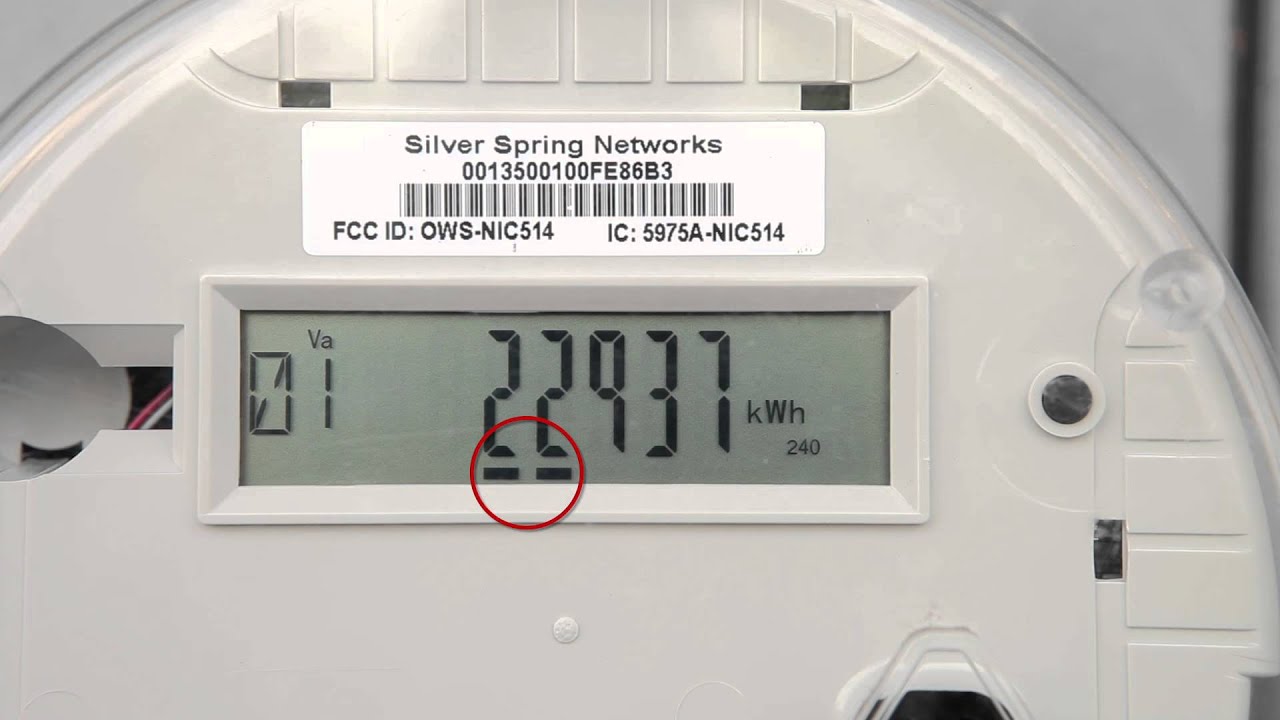
The advent of smart electric meters has revolutionized how consumers interact with their energy consumption data, offering unprecedented insights into household usage. These advanced devices provide more than just a monthly bill; they deliver real-time information that can empower users to make informed decisions about their energy habits. Understanding how to read your smart electric meter is a fundamental step toward taking control of your electricity costs and promoting energy efficiency within your home. While the specific display and navigation might vary slightly between models and utility providers, the core principles of interpreting a smart electric meter remain largely consistent across the board. This guide will walk you through the essential steps to confidently read and understand the data presented by your meter.
Understanding Your Smart Meter Display
Unlike traditional analog meters, smart meters feature a digital display, often an LCD screen, that presents various data points. This display typically cycles through different readings automatically, or you might need to press a button to navigate through them. Familiarizing yourself with the common elements on your meter’s screen is the first step.
Common Display Elements and Their Meanings
Smart meters can display a wealth of information. Here are some of the most frequently encountered readings:
- Total Consumption (kWh): This is the most crucial reading, showing the cumulative amount of electricity your property has used since the meter was installed or last reset. It’s usually expressed in kilowatt-hours (kWh).
- Time-of-Use (TOU) Readings: Many smart meters track consumption during different periods, such as peak (high demand, higher rates) and off-peak (low demand, lower rates). You might see separate readings for “Peak kWh” and “Off-Peak kWh”.
- Export Reading (kWh): If you have solar panels or other micro-generation systems, your meter might display an export reading, indicating how much surplus electricity you’ve sent back to the grid.
- Import Reading (kWh): This is the electricity drawn from the grid, which is typically the primary consumption reading for most households.
- Current Demand (kW): Some meters can show your instantaneous power demand, indicating how much electricity your home is using at that precise moment.
- Meter Status Codes: These are often small symbols or codes indicating the meter’s operational status, such as whether it’s communicating with the utility, if there’s an error, or if it’s currently importing or exporting.
Step-by-Step Guide to Reading Your Meter
While models vary, the general process for reading a smart electric meter involves locating the display and understanding how to cycle through its information. Most meters will have one or more buttons for navigation.
Navigating the Buttons and Display
Follow these general steps to retrieve the necessary information from your meter:
- Locate Your Meter: Your smart meter is typically installed on an exterior wall of your property, often near your main electrical panel.
- Identify the Display: Look for the digital screen. It might be continuously active or could be in sleep mode to conserve power.
- Find the Button(s): Most smart meters have one or two buttons. They might be labeled “Display,” “Scroll,” “Read,” or have an arrow icon. If there are multiple buttons, one is usually for scrolling through readings, and another might be for entering menus or confirming selections.
- Press the Button to Activate/Scroll: If the display is blank, press any button to wake it up. Then, repeatedly press the scroll button to cycle through the various readings.
- Record the Relevant Readings: Pay close attention to the labels on the screen (e.g., “TOTAL kWh,” “IMP kWh,” “PEAK,” “OFF-PEAK”). Jot down the numbers you need, usually the total import kWh, for your records; Some meters might show the value and then the unit (e.g., “123456” followed by “kWh”).
- Understand the Decimal Point: Ensure you note the entire number, including any digits after a decimal point if present. Utility companies usually read to a certain number of decimal places. Your smart electric meter provides accurate data, so capture it completely.
If you encounter difficulty, consult your utility provider’s website or the meter’s manual for specific instructions for your model. They often have detailed guides or videos explaining their particular smart meter type.
Interpreting Your Data
Once you’ve recorded your readings, understanding what they mean is crucial. Comparing current readings with previous ones allows you to track your energy consumption over time. For instance, if your total kWh reading was 12345 on the first of the month and is now 12645, you’ve used 300 kWh during that period. This information, especially when broken down by time-of-use, can highlight periods of high consumption and help identify energy-intensive appliances or habits.
Many utility companies offer online portals or mobile apps that connect directly to your smart meter data, providing even more granular insights, graphs, and historical usage patterns. These tools often present the information in an easy-to-understand format, negating the need for manual meter reading in most cases, but knowing how to read the meter directly offers peace of mind and an independent verification source.
Frequently Asked Questions About Your Smart Electric Meter
Q: Do I still need to read my smart meter manually?
- A: In most cases, no. Smart meters automatically send readings to your utility company. However, knowing how to read it yourself can be helpful for verifying bills, tracking real-time usage, or if there’s a communication issue with the meter.
Q: How often does a smart meter send readings?
- A: This varies by utility, but typically smart meters send readings daily, hourly, or even every 15-30 minutes, allowing for very detailed consumption data.
Q: What is the difference between kWh and kW?
- A: kWh (kilowatt-hour) is a unit of energy, representing consumption over time (e.g;, a 1 kW appliance running for one hour uses 1 kWh). kW (kilowatt) is a unit of power, representing the instantaneous rate at which energy is being used.
Q: Can a smart meter help me save money?
- A: Yes, indirectly. By providing detailed insights into your energy usage, a smart meter empowers you to identify wasteful habits, understand peak consumption times, and adjust your behavior to reduce your electricity bill.
Q: What if my smart meter display is blank or shows an error?
- A: First, try pressing any buttons to wake it up. If it remains blank or displays an error code you don’t understand, contact your electricity provider. There might be a power outage affecting the meter or a technical issue requiring professional attention.
Mastering the ability to read your smart electric meter is an invaluable skill in the modern energy landscape. It not only provides transparency into your household’s electricity consumption but also equips you with the knowledge to make more sustainable and cost-effective energy choices. By regularly checking your meter and understanding its various readings, you can become a more informed and empowered energy consumer, actively contributing to a more efficient and conscious use of resources.